Showing posts with label gwt. Show all posts

GWT 1.4RC1 gwt.xml classpath blues

Before I get started with the post itself:
Happy Independence Day!
Now on with the story...

I've been working on creating a web app using GWT 1.4RC1. For this, I borrowed some source from this other app I had, which I'd developed using GWT 1.3

All was well for a couple of days until today when I (quite suddenly) started getting this error:
[ERROR] Unable to find 'IndexService.gwt.xml' on your classpath; could be a typo, or maybe you forgot to include a classpath entry for source?

I must admit I'm not sure what exactly caused this to happen.

I tried all the usual solutions. I tried compiling it outside of IDEA (I'm using IntelliJ IDEA 6.05 with the GWT Studio plugin), tried checking the location where java compilation was dropping class files and plenty of Googling. Finally I even tried moving back to 1.3. No luck. In fact, the move back to 1.3 caused a bunch of other things to break in weird ways including a request for a non-existent nocache.js file.

Finally, the solution turned out to be quite simple, though I'm not sure if this is a 1.4 requirement or is a 1.4RC bug, since it worked just fine under 1.3 with a warning or two.
The following line in IndexService was the culprit.
((ServiceDefTarget) app).setServiceEntryPoint("/IndexService");
Here is the first solution I came up with.
((ServiceDefTarget) app).setServiceEntryPoint("/com.this.and.that.index.Index/IndexService");
Incidentally, this is how you make the service call 'module relative' and get rid of the [WARN] Use of deprecated hosted mode servlet path mapping warning, by prefixing the GWT module name before your service path. However, the best solution seems to be to let GWT handle this bit like so:
((ServiceDefTarget) app).setServiceEntryPoint(GWT.getModuleBaseURL()+"/IndexService");

GWT 1.4 is supposed to be significantly lighter than 1.3 in terms of the quantity of javascript that is generated. Hopefully I'll be able to see this for myself soon enough. Perhaps I'll even have enough material for a post on the topic.

Bringing business logic to the browser, or why you should develop in JavaScript

A few weeks ago, I'd observed an interesting side-effect of building an AJAX web application - that the content served asynchronously would not be available to search engines. I'd written a post about it, trying to express the idea that there may be a way of categorising web applications based on whether the content served is the kind that it is valuable to index for search (Wikipedia, Amazon) or where it simply doesn't make sense (Google docs, the vast majority of enterprise web applications). Unfortunately, I made two mistakes. One was that I used the terms 'web site' and 'web application' to distinguish between the two - these terms already mean a lot of things to a lot of people - and second, the idea was raw and my articulation poor.

However, that idea has stayed with me and I've been thinking about it a fair bit since that last post and I've come to the conclusion that what I'd made the focus of my post was merely a side-effect of other, larger trends we're seeing around web frameworks, the relevance of HTML and the way we do web development in general. Please bear with me while I put these ideas down and feel free to flame me to your heart's content in the comments section :-). I'm looking forward to the feedback on this.

First off, I want to get rid of the language baggage for the purposes of this post. I'm going to christen the two types of web applications I have in mind as the web based Information Publisher application and the web based State Interaction application.

An Information Publishing application is a web application whose primary focus is to serve content. The content can be video, audio, text, whatever, but the job of the application is to just serve content. A classic example would be something like Wikipedia or Google search. In both cases, there is information which needs to be served to an audience for consumption. The fact that content in Wikipedia is fairly static while that in Google search is highly dynamic doesn't change the fact that they still essentially publish information.

Contrast this with the web based State Interaction application where the objective of the application is to allow the users to interact with various entities and affect their state (again, Google docs and most enterprise applications). You may publish information as the end product (generate reports, say), but this is not to be confused with the act of creating that information by allowing user interactions with various entities.

The interesting thing is that many web applications have both types and you see one or the other depending on what you're doing with them. Any decent wiki is a good example - when you're in 'edit' mode, it's a State Interaction application (a developer would immediately see entities like Page, Content, History etc.) and when you are viewing wiki content, it's an Information Publisher. The authentication functionality that many websites display is again an example of a State Interaction built into what is otherwise an Information Publisher.

Now, let me explain why I think this distinction is important.
The common underlying infrastructure available to both types of applications is the web browser, with rendering through HTML and communication with the server through gets, posts or AJAX.

In the case of an Information Publisher, this infrastructure is ideally suited to the task. HTML was, after all intended for precisely such uses. Communication with the server to request certain kinds of information can be handled easily and elegantly using name-value pairs (parameters) in a get or post request. A Google search request for the word 'hello' looks like this: http://www.google.co.in/search?q=hello. Nice.
State Interaction applications on the other hand usually have a whole bunch of entities which the user needs to interact with and which usually also need to interact with each other. These live on the server and their interaction with the user is through a user interface rendered using HTML. Changes to the state of an entity or object happen, again, by sending name-value pairs or a json string containing data to the server where these are parsed and some action is taken to alter the states of various objects. To put it bluntly, you have a bunch of objects which demand a high degree of interactivity and we get our UI to talk to them by passing strings around! Not so nice.

The fact that this pain has been felt by developers can be seen in the evolution of web development over time. A bunch of frameworks and tools have been created which build abstractions over this infrastructure to make State Interaction application development easier. For example, ASP.Net 1.1 tried to bring in abstractions which mimicked those used in WinForms. However, attaching an event trigger to a check box (something we do routinely in thick clients) would result in a page reload every time that box was checked or un-checked. The abstraction was defeated by the limitations of infrastructure used (posts). You could develop the same way as you did in WinForms, but the results were far from satisfactory. Things like this made it obvious that while we did need an abstraction, it couldn't really mimic the desktop world where the UI and the model are a method call (or ten :-)) apart. Sure, you're still using a MVC, but very differently from how you would in a thick client. And a whole lot of web frameworks like Spring and Rails have sprung up to support this abstraction. However, these still failed to address the fundamental problem - that highly interactive UI's cannot effectively communicate with their models (data binding, anyone?) by passing strings around.

Why is it that people say thick clients are more interactive than web clients? That this is true is not in doubt, or we wouldn't have such a hullabaloo about AJAX and the responsiveness it introduces. Often, this lack of responsiveness is blamed on the rendering engine of the browser, which renders content using HTML. Obviously, you're told, a markup language cannot be as flexible and easy to develop UI elements in as is a thick client rendering environment using abstractions like Panels, MenusBars and what have you. But this is no longer true since the entire HTML DOM is available for us to manipulate using javascript and the DOM tree structure is remarkably similar to the tree structure of nested widgets in a thick client, something the GWT has used to build up an excellent abstraction - but more on that later in the post.

Therefore, I concluded that this lack of responsiveness has less to do with the rendering medium and is mostly because the communication pipe between the UI and its backing model in a web application is far less effective that that in a thick client.
Which of course begs the question, 'Why have we been so poor in bringing the model from to server the browser?' The obvious answer is performance. Until recently (in fact I'll go so far as to say until the release of Firefox 2) the performance of javascript was so poor as to prevent its utilisation for anything more than a handful of field validations. Creating more than a couple of dozen or so DropAreas on a page using Scriptaculous would make dragging anything so slow that it was next to unusable. But javascript performance has increased in leaps and bounds and it is now possible to actually develop full fledged MVC architectures running purely on the browser, much like a thick client. AJAX is used purely to sync the model on the client with the model on the server, exactly like you would in a thick client. One of the earliest abstractions developed to support this model of State Interaction application design was the GWT. People have shied away from developing applications purely in javascript for many reasons, but the GWT eliminated most of them in one fell swoop. However, there is a general awareness now that developing within a disciplined framework makes life a lot easier (a lesson learned from Rails) and we're seeing javascript MVC frameworks like Jamal and TrimPath surface which are trying to build on this experience to make disciplined development in javascript easier. We've seen pure javascript client applications before in websites like Netvibes, a feed reader with a thick client feel and bunch of desktop UI entities like windows, titlebars and tabs which has been around since 2005. However, it's only now that we're seeing this style of development starting to move into the mainstream.

Of course, these abstractions still stuffer from limitations imposed by the underlying infrastructure. For one, javascript doesn't support threading, so data binding in a GWT application should be handled delicately or you could end up with annoying screen freezes. But all things said and done, these applications are still far more responsive than traditional web applications where the model sits only on the server. As importantly, they are far easier to develop since as I said before, server calls are purely for model syncing and your view objects can talk to model objects using method calls.

Having said that, client side models are a fairly bad idea for a Information Publisher for the simple reason that they're quite unnecessary. The challenge, in my opinion, is to clearly identify which portions of a website require State Interactions and which are good old Information Publishers and implement them accordingly using the appropriate technologies. I'd gotten quite gung-ho about GWT and went and developed an Information Publisher type website using it, only to realise later that none of the content was available through a Google search (I did however fix that issue, but it was a hack which won't scale). You can imagine where this could be crucially important to some websites, especially those which sell products or services. AJAX and dynamic rendering are pretty cool, but should be used appropriately.

To summarise, when developing a web application, it is important to identify which parts of it are information publishers and which are state interactions. As the complexity of the state interactions increases, one should seriously consider bringing the model from the server to the client and using AJAX just to keep the model data in sync. Tools like the GWT, Jamal and TrimPath not only make this possible, but also supply a whole lot of infrastructure (like unit testing and debugging in the GWT, scaffolding in TrimPath) to make the developer's life easier when developing in javascript.

Update: 2007/06/27
I'd originally titled this article 'Why things like the GWT and Jamal are going to help keep web developers sane' but changed it because it was rather vague.

You may also want to read: When should you choose Google's GWT for your web app?

The difference between a web application and a website

Something worth considering in this era of powerful, interactive - alright, let me grit my teeth and say the buzzword - Web 2.0 websites, is where the line is drawn between a website and a web application. Why am I bringing this up? Read on.

I'd been building this website about a month ago. This is a simple site, no rocket science, just a bit of content that needed to be made available on the net. After a fairly frustrating time trying to achieve the desired effect using CSS (I'm no expert :-)) I gave up and decided to use tables.
Once I'd made that decision, it seemed logical to me to just develop in GWT and be done with it, since I wanted to have a bunch of divs and manipulate them with javascript. I could then layout the lot using GWT's VerticalPanels and HorizontalPanels which translate to tables anyway. All the content would be rendered dynamically, but I saw no problem with that.
To cut a long story short, I got the site done and put it up, replacing an older one which we weren't too happy with - until a few days later we realised that a Google search for 'Activ Mobs' produced nothing from the site except the link. Obviously (hindsight is always 20/20) Google is not going to execute all that javascript to produce the content and then index it.
Which brings me to my point (finally!) - if you've got a website from which you do want content available to search engines, then it's still a website and you want to be careful about which bits you render using javascript, Adobe Flex, Microsoft Silverlight or other similar technologies. On the other hand, if there is content which makes no difference if it was indexed, then it's probably a web application.
The way I got around this little problem for the Mobs website was to copy the content and drop it into the host html page as a hidden div. It's all there for the search engine, links included, but is never actually visible to the end user. Of course, I was able to hack my way out of the situation because the amount of copy was miniscule. Hacks never scale too well, unfortunately, so someone choosing to dynamically populate large quantities of copy in a website which should be searchable might get themselves into a bit of a mess.

Update: 2007-05-03
I am by no means trying to actually identify the differences between a web app and a website, but rather emphasise the importance of identifying content which we want available to search engines quite early in the development process. Designers and developers need to ensure that this content is rendered in a manner which makes it accessible to a crawler. Given the amount of traffic many websites derive from Google, having important content served through flash or rendered dynamically using javascript could drastically reduce referrals from Google search.

Update: 2007-06-07
There were several thoughts which came out of this, one of them being that the whole model of web development is pretty messed up for certain kinds of applications. I've written a post explaining what I mean by this and why we should have our business models on the browser in javascript and use AJAX only to keep them synced with the server. You can find it here.

You may also want to read: When should you choose Google's GWT for your web app?
You may also want to read: Bringing business logic to the browser, or why you should develop in JavaScript

GWT Unit Tests running slowly? Use a TestSuite.

If you've written GWT unit tests for your app, you've probably realised that they run quite slowly. Most of the time, the delay seems to be in creating the context in which that test will run rather than in the test itself. This delay can be quite painful in situations where a large number of test cases are being run - as part of a Continuous Integration build process for example.

We were able to significantly reduce the running time of all the GWT test cases in our build by simply placing them in a TestSuite. Unfortunately, TestSuite is not one of the classes that is extended by the GWT's implementation of JUnit, but we didn't notice any real problems while using it.

Of course, since TANSTAAFL is one of the laws which governs our universe there is a trade-off to be made. When running a TestSuite you have to allocate enough memory for all the tests in all the TestCases in that TestSuite. GWT is quite a memory hog and can easily require over a Gigabyte of memory allocated to it. However this shouldn't pose a big problem and the reduction in build feedback time is more than worth it.

Using TestSuite creates a new problem though. People routinely forget to add the TestCases they create to the TestSuite which is run by the build. Consequently you end up with bits of functionality being broken but not being detected simply because the relevant tests are not being run during a build.

Around the third time this happened, I got frustrated and decided to automate the process. We used Ruby to write a little script which would pick up all the TestCases in a particular directory and add it to a template. It's pretty rough but it works, so whatever...
Just remember that it doesn't auto-generate imports, so you'll have to add those to the template manually. It isn't hard to modify the script to do this too, but it happened sufficiently rarely in our case that I didn't bother.

On Windows, we needed to check in just two files to use Ruby - msvcrt-ruby18.dll and ruby.exe

Here's the code listing:

suite.template

import junit.framework.TestSuite;
import junit.framework.Test;
import com.whatever.imports.you.need.*;

public class GWTTestSuite extends TestSuite {
  public static Test suite() {
    // Five hashes are what the ruby code replaces
    Class[] tests = {
      #####
    };

    TestSuite suite = new TestSuite();
    for (int i = 0; i < tests.length; i++) {
      suite.addTestSuite(tests[i]);
    }
    return suite;
  }
}


gen.rb

java_files = Array.new
gwttestfiles = Array.new

jfiles = File.join("**", "*.java")
#Change working directory to the GWT test directory
Dir.chdir("\\your\\project\\path\\testgwt")
Dir.glob(jfiles) {|x|
  java_files<<x if "#{x}".include?("Test")
}

java_files.each do |element|
  file = File.new(element)
  matched_lines = file.select{|line|   line.match('\s*public\s+void\s+test.*')}
  if matched_lines.size > 0
    name = File.basename(file.path)
    gwttestfiles<<name.gsub("\.java","\.class")
    puts "Located: " + name
  end
end

classes_string = gwttestfiles.inject { |result, klass| result + ",\n" + klass }

file = File.new("\\your\\project\\tools\\ruby\\suite.template")
File.open("GWTTestSuite.java","w") do |output|
  file.each do |line|
    line.include?("#####") ? output.write(classes_string) : output.write(line)
  end
end


The Ant target to run the ruby script:

<target xmlns="" name="generate.gwt.test.suite">
  <exec dir="\your\project\tools\ruby\" executable="\your\project\tools\ruby\ruby.exe" failonerror="true">
    <arg value="gen.rb"/>
  </exec>
</target>

GWT cross-domain gotcha

If you're developing GWT on Windows with something other than GWT's own Java code on the server-side (I hit this when using PHP), here's a gotcha for you.

IE allows cross-domain submission of forms. Firefox does not.

So you'll successfully create a FormPanel, click the submit button and have a response show up in 'hosted mode' in IE. But when you compile your application with the GWT compiler and then run it in 'web mode' in Firefox, you get no response.

The solution is simple - just make sure that the www directory (which is where the GWT compiler dumps its output for me) is within your server, and consequently on the same domain as your server-side code and that you access it as such.

When should you choose Google's GWT for your web app?

Up until about ten months ago, very few people would have considered javascript as a language in which one could build significant portions of the UI of an enterprise application. If, say, I needed to display a table of information with support for sorting and filtering, I would have been far more likely to do this processing on the server than to write it in javascript - simply because clean, maintainable and testable javascript code is not very easy to write - in contrast to something in say Java, C# or Ruby.

I guess it's pretty obvious where I'm coming from. I'm talking about the classic enterprise application where the focus is developing a robust code base with excellent test coverage which allows for easy maintenance and where the language of choice has good tool support so refactoring is joy for all concerned. These constraints pretty much eliminated javascript. Why is this so?
  • Javascript is a dynamic language. This requires that the developers be more disciplined.
  • Javascript (and other dynamic language) tool support has improved dramatically over the last couple of years, but still lags far behind Java and C# (with ReSharper installed, that is ;-))
  • Unit testing, while it exists, isn't very convenient.
  • This is a bit of a repetition but whatever; good Object Oriented Programming is very hard to do in javascript. And while you can do some pretty powerful stuff with blocks and closures, it takes a certain kind of developer to do a good job of it.
  • Cross browser compatibility. This is a complete nightmare. Of course I'll be the first to admit that on most enterprise projects there is just one target browser.

Bottom line - the life saving test-code-refactor cycle is far more difficult to implement when coding in javascript.

Once GWT comes into the picture, the scenario changes dramatically. GWT allows you to code in Java and compiles all that code into Javascript. What's more, the DOM element wrappers that GWT provides mimic Java Swing. As far you're concerned you are now in Swing territory with all it's tried and tested approaches and patterns. GWT also provides it's own implementation of JUnit which look and feels much the same as it's parent (no setUp(), but you can't have everything, what?) Most of the overheads of working with javascript for UI are removed (and yes, a few are added, what with Java not being dynamic :-))
You can now bring the awesome power of IntelliJ or Eclipse to bear on the problem. You can write all the unit tests you want. You're no longer worrying about that annoying javascript filterable table which five different developers have worked on and the customer really likes but which is now brittle and utterly unreadable.
You've now got a neatly separated domain model, presentation model, controller and view.
And it's all unit tested.
And you can refactor all you want.
And async calls/AJAX become utterly trivial.
And it's browser compatible.
No more muttering about having to manage with simple text renames instead of Alt+Enter/Ctrl+1. No more muddling around with explicit XMLHttp or JSON calls. The latter are now abstracted to simple RPC style method calls.

Of course, nothing is perfect. First, you need to choose between GWT layouts and CSS. Second, GWT apps are single page apps with all changes handled via DOM manipulations. If you're developing a site where users are likely to just drop by to view a single page for a short span of time (IMDB, Amazon - you get the picture...), then it doesn't make sense to dump 200KB of javascript on them - which is pretty average for a sample GWT application. The biggest danger is of course the temptation of trying to develop a full fledged thick client in the browser. Javascript executes pretty slowly compared to thick client UI written in managed languages - and this remains true even with the dramatic improvements in performance we see in Firefox 2.0 and IE7. Just try creating a simple application supporting the kind of complex drag-drop we see in many thick clients. Performance starts to degrade rapidly and soon the app practically freezes in the browser. The pitfalls are many and it is very important to keep in mind that GWT only offers the convenience of developing with a thick client paradigm and that your code is ultimately interpreted javascript which is going to be doing plenty of DOM manipulation. There are dozens of such nits one can pick - 'nuff said.

To summarize - thanks to GWT, we are now in a position to develop complex, rich, AJAX web-applications considerably faster and more reliably than we could using hand-coded javascript. The code base is more robust, easier to maintain and enjoys much better tool support. There will probably be some loss of performance, but one of the goals of the GWT team is to make the GWT compiler be to javascript what modern C/C++ compilers are to assembly. You just assume that most of the time the compiler can optimize far better than you can. GWT also costs you nothing and is completely OSS under an Apache licence and is being developed by a crack team of Google coders. It's just as important to remember what GWT isn't. GWT isn't a javascript library - it's a compiler. GWT also isn't a full stack solution - for that you'll have to whip up your own (I've had good experiences with Hibernate and XStream) or you can look at something like Spring.

Update: 2007-06-07
There were several thoughts which came out of this, one of them being that the whole model of web development is pretty messed up for certain kinds of applications. I've written a post explaining what I mean by this and why we should have our business models on the browser in javascript and use AJAX only to keep them synced with the server. You can find it here.

You may also want to read: The difference between a web application and a website
You may also want to read: Bringing business logic to the browser, or why you should develop in JavaScript
You may also want to read: JavaScript on Rails is here, and it promises to be as good as Ruby on Rails!

Google follows Yahoo and Tibco into AJAX OSS land - but how far are they willing to go?

Google has announced that GWT 1.3 RC is now completely open source under the Apache 2.0 licence.
This coming right after Yahoo released their User Interface Library and Tibco their General Interface AJAX Library under an open source BSD licence (though GI does have a commercial licence too) seems to indicate an interesting trend in the industry. That's three big names in rich web application development choosing to go open source in the last year.
Of course, there is open source and open source. One kind has a community contributing to it (scriptaculous, dojo), the other does not. The question is how far toward the community model are each of these projects prepared to go and if they see any value in making such a move.
A quick look at the GI website showed no obvious links for those interested in contributing. Yahoo and Google are rather more 'open' as their source is available for checkout from their Subversion repositories on Sourceforge and Google Code respectively, with very clear directions on how to do so (well, actually the instructions are from Sourceforge and Google Code but whatever). They however cannot yet be categorized as community projects. Indeed in contrast to, say, scriptaculous' large and lively community of contributors and clear instructions on their wiki on how to contribute, the most active community participation on the others seems to be in the user groups.
I took a look at YUI's patch submissions on sourceforge and there were a measly dozen or so patches contributed. GWT is way too new - we'll have to wait and watch. And like I said, there seems to be no obvious way to contribute to GI, though Tibco does have a developer network where they ask users to contribute to the discussions and feedback.

Update: 20061215, 0905
As Kevin Hakman from Tibco points out, GI is being rolled out in three phases, the last of which allows contributors to submit their code. I suppose this puts GI in the same 'wait and watch' category as GWT.

Update: 20061220, 1930
I'm not posting past 3am again when I'm too knackered to research effectively. Read this page at the GWT site on how to contribute, among other things. Now I guess it's just a question of which one (or more than one) of these projects the community picks up and runs with and how much this benefits the project over and above the obvious one of bugs being spotted early.

GWT frontend to a Django backend?

Yeah, that's exactly what someone's managed. Read more about it here and try out the app he built using this approach.
I've been saying "If only I could do the UI for my Rails apps in GWT" for a while now. Hmm...

A beginner's guide to javascript libraries

http://codecraft.info/index.php/archives/58/

The comments also introduce jQuery which looks quite interesting.

Update: 20061126, 0230
As my colleague Sudhindra pointed out in his comment, I did miss out behaviour.js which allows you to write much cleaner HTML. Funny he mentions it, because I have a post on a behaviour.js hack to reapply styles to dynamically added or modified DOM elements - something which most AJAX apps tend to do - sitting in the Drafts section of my blog for almost a month now pending my figuring out how to post HTML markup on blogger (something I complain about in my very next post!).

Yahoo YUI integration with GWT

I'm working on this mostly to get familiar with JSNI and structuring in GWT. The sample is far from complete, but it's enough if all you want is the JSNI to interface with YUI's DragDrop. All you need to look at are the Draggables and Droppables classes and the DragDropListener interface.
The code is grossly over-complicated for its intended function, but I don't really care since I'm trying to familiarise myself with a few concepts.

Download the sample app here.

I'm hosting the download on geocities (for the moment) which has a 4MB per hour limit on downloads. I doubt I'll hit that but I figure you should know, just in case...
I'll be posting updates as I work on the code. All the zips are date-time stamped; I guess that'll work just fine as a version number.

You'll also need to download GWT if you want to try it out for yourself. You'll need to change the path in the GWT shell launcher batch file in the sample to point to your GWT install directory.

Update: 20061124, 0200
I created a code.google.com thingie. Pretty painless, compared to Sourceforge. And it uses Subversion (hurray!). Of course, there's no built in distribution mechanism like Sourceforge has - not that I could find anyways. I'll add the date-time stamp to the changelog. Check it out; no pun intended. - http://code.google.com/p/ygwt/

Update: 20061124, 2315
This is in response to Andy's comment:


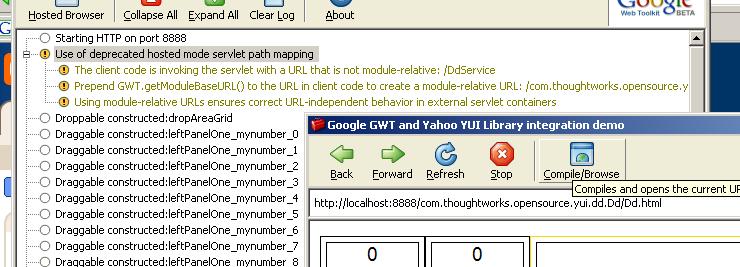
Andy, here is a shot of how the GWT shell looks after launching the app from the batch file. For me, the 'deprecated hosted mode' message is just a warning, not an error. I've built this example with 1.2.22 too. Is it possible you're getting an exception somewhere further down the line?

Update: 20061129, 0130
I've been checking code into the Google Code repository fairly often. Will produce another downloadable sample when I've finished the contraints for the drop area grid.

Update: 20061218, 2115
I'd been unable to run unit tests on this IDEA project for a while (it would just refuse compile) and it'd been annoying me no end. Well I found the solution buried in the fifth reply to a post on the GWT mailing list a couple of weeks ago... all I had to do was add

<inherits name='com.google.gwt.junit.JUnit'/>

to my gwt.xml - so now I'm chugging away with unit tests! Forgot to post this update earlier. This code sample now seems to also be describing my understanding of MVC and how to implement it in GWT. I'm doing a fair amount of refactoring as my understanding progresses. It's a bit over-designed given the simple nature of the problem, but it's fun to try new ideas out.

"Too much recursion"

That's the Javascript error I'm getting on Firefox when I run my GWT app. It works fine on IE, though. And here I was hoping to be done with my YUI based GWT drag-drop example in a day or two. No point in continuing unless I can get it working on FF, though.
It looks like an equals() function is being called recursively somewhere. Debugging generated javascript is a total nightmare. Oh well, back to work...

Update (20061123,1910):
Got it working. Of all the dumb things, it was a call to the toString() function of a GWT JavaScriptObject instance in my Java code. Commented it out and everything runs fine.

GWT: Browser compatibility vs. CSS Flexibility

You might have heard that browser compatibility comes free with GWT. It's true, but it comes at a price - that of CSS flexibility.

If you're the kind of person who likes to produce web apps that go the Zen Garden way, then you'll have to give up the layout compatibility that GWT offers (you still get compatible javascript, though). See, the deal is that GWT offers three kinds of layout panels - horizontal, vertical and flow. While the latter produces pure divs, the first two can (and often do) use tables. And that means goodbye to making that annoying vertical menu horizontal by changing your CSS.

So if CSS is your style, stick with GWT FlowPanel and you're cool. Except for cross-browser layout issues, of course.